Design of a Smart Agricultural Greenhouse Environmental Control System Based on STM32
Abstract
To address the high labor intensity and slow response of manual greenhouse management, this paper presents the design and implementation of a smart agricultural greenhouse environmental control system based on STM32. The system uses the STM32F103C8T6 as its control core: a DHT11 samples in-cabin temperature and humidity, a BH1750 measures light intensity, and a DS3231 provides real-time clock. Five hysteresis-based automatic control rules drive relays and a MOSFET to orchestrate five actuators — fan, heating pad, humidifier, grow light and buzzer — augmented by two configurable timing windows for supplemental lighting and ventilation. User parameters are persisted to the on-chip Flash retention area with CRC16 verification; a Chinese OLED menu with four buttons provides local interaction, while an ESP12F converts serial protocol frames into an HTTP+JSON API consumed by a React Native mobile app over the LAN. Tests show that the control rules behave correctly, the mutual-exclusion and priority design is sound, and parameter retention is reliable, meeting the automation needs of small greenhouses.
Keywords: STM32; greenhouse; hysteresis control; timing window; power-loss retention; ESP12F
1 Introduction
Greenhouse cultivation imposes strict windows on temperature, humidity and light: excessive temperature calls for ventilation, insufficient temperature for heating; overly humid air invites disease while overly dry air impairs transpiration, and winter daylight often needs artificial supplementation. Traditional greenhouses rely on manual inspection and hand-operated switches, which respond late and demand heavy labor.
Commercial agricultural controllers are usually implemented as bare-metal delay loops, suffering from unstable timing, no power-loss retention of parameters, and no networking. This paper designs a greenhouse environmental control system centered on the STM32F103C8T6: the software adopts a super-loop with software-timer frequency division for precise control cadence; the control strategy introduces hysteresis and mutual exclusion to prevent actuator chattering; data management implements CRC16-verified power-loss retention; and an ESP12F connects the system to a mobile app, closing the loop of "sensing — decision — actuation — interaction".
2 Overall System Design
2.1 Requirements
The system shall:
- Sample in-cabin temperature, humidity, light intensity and clock in real time;
- In automatic mode, orchestrate five actuators by thresholds without chattering;
- Support two timing windows (lighting and ventilation) configurable across midnight;
- Offer automatic/manual modes, with per-channel device control in manual mode;
- Retain threshold and window parameters across power cycles;
- Provide a Chinese OLED menu locally and remote monitoring via a mobile app.
2.2 Architecture
The system follows a two-layer architecture: "STM32 for sensing and control + ESP12F for networking". The STM32F103C8T6 runs a bare-metal super-loop with several software timers built on HAL_GetTick(): sensor sampling every 2 s, RTC reading and automatic control every 1 s, OLED refresh every 500 ms, and serial data-frame reporting every 2 s. The ESP12F exchanges custom @-protocol frames with the STM32 over USART1 and exposes an HTTP+JSON API that both the mobile app and web client consume.
Compared with an RTOS, the bare-metal super-loop is simpler and more reliable for this scenario: all tasks are short periodic jobs (the longest single-loop blocking is one DHT11 read of about 25 ms), software-timer division satisfies the 1-second control cadence, and it avoids RTOS priority and stack management complexity.
2.3 Component Selection
| Category | Model | Key specs | Role |
|---|---|---|---|
| MCU | STM32F103C8T6 | 72 MHz, 64KB Flash, 20KB RAM | Sampling, control decisions, menu |
| Temp/RH | DHT11 | ±2 ℃ / ±5%RH, 1-wire | In-cabin temperature and humidity |
| Light | BH1750 | 1–65535 lx, I2C addr 0x23 | Light intensity |
| RTC | DS3231 | I2C RTC, ±2ppm, coin-cell backup | Timing windows and display clock |
| Display | OLED 0.96" | 128×64, SSD1306, I2C 0x3C | Chinese menu |
| Actuator | Relays K1/K2 | 5 V, active-high | Fan / heating pad switching |
| Actuator | N-MOS low-side module | Level-triggered | Humidifier power switch |
| Lighting | LED strip | Active-high | Supplemental lighting |
| Alarm | Active buzzer | NPN driven | Out-of-range alert |
| Network | ESP12F | 802.11 b/g/n, HTTP server | Protocol conversion and OTA |
| Input | 4 tactile switches | EXTI falling edge + debounce | Menu operation |
3 Hardware Design
3.1 Pin Assignment
| Peripheral | Pins | Notes |
|---|---|---|
| DHT11 data | PA8 | 1-wire, open-drain + pull-up |
| BH1750 | PA0(SCL) / PA1(SDA) | Bit-banged I2C |
| OLED SSD1306 | PB8(SCL) / PB9(SDA) | Bit-banged I2C, addr 0x3C |
| DS3231 | PB12(SCL) / PB13(SDA) | Bit-banged I2C, driver-managed GPIO |
| Keys KEY1–KEY4 | PA3 / PB5 / PB6 / PB7 | Pull-up input, EXTI falling edge |
| Relay K1 (fan) | PB3 | Active-high |
| Relay K2 (heater) | PB4 | Active-high |
| Humidifier (N-MOS) | PB14 | Active-high |
| Grow light LED | PB15 | Active-high |
| Buzzer | PB1 | NPN driven, active-high |
| USART1 | PA9(TX) / PA10(RX) | Protocol frames to ESP12F |
| USART3 | PB10(TX) / PB11(RX) | Debug print |
3.2 Actuator Drive Circuits
The fan and heating pad are inductive/high-power loads driven through 5 V relays; the MCU GPIO only supplies an active-high control signal, keeping low- and high-power domains fully isolated. The humidifier module is level-enabled with its button permanently shorted, so an N-MOS low-side switch controls module power: powered means spraying, unpowered means stopped. PB3/PB4 default to JTAG debug pins after reset; the firmware releases them as GPIO via AFIO remap SWJ_NOJTAG (SWD kept for flashing).
3.3 HMI Circuits
The four buttons follow an intuitive layout — leftmost for confirm, second for back, the right two for up/down. EXTI falling edges trigger with in-ISR debouncing and level validation; the main loop consumes key events centrally. The OLED renders mixed Chinese 16×16 / ASCII 8×16 text across four lines, organized as two home pages and four function pages.
4 Software Design
4.1 Main Program Flow
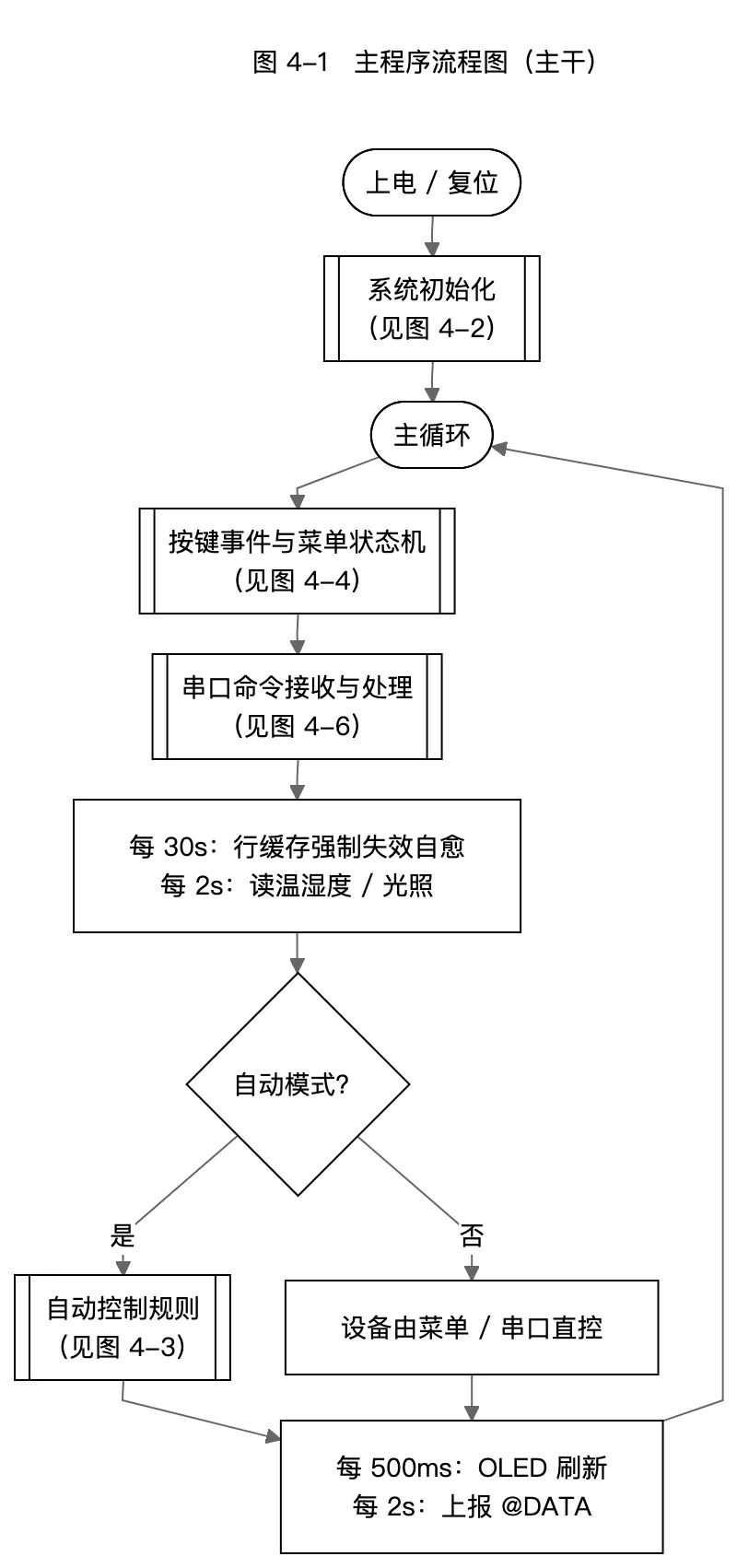
The main program is a super-loop that processes, per iteration: periodic line-cache invalidation, key events, serial frame parsing, and four software timers (sensors 2 s, control 1 s, display 500 ms, reporting 2 s). Since all tasks are short, single-iteration overhead is negligible and the control cadence is guaranteed by HAL_GetTick() deltas regardless of loop-body jitter.
4.2 System Initialization
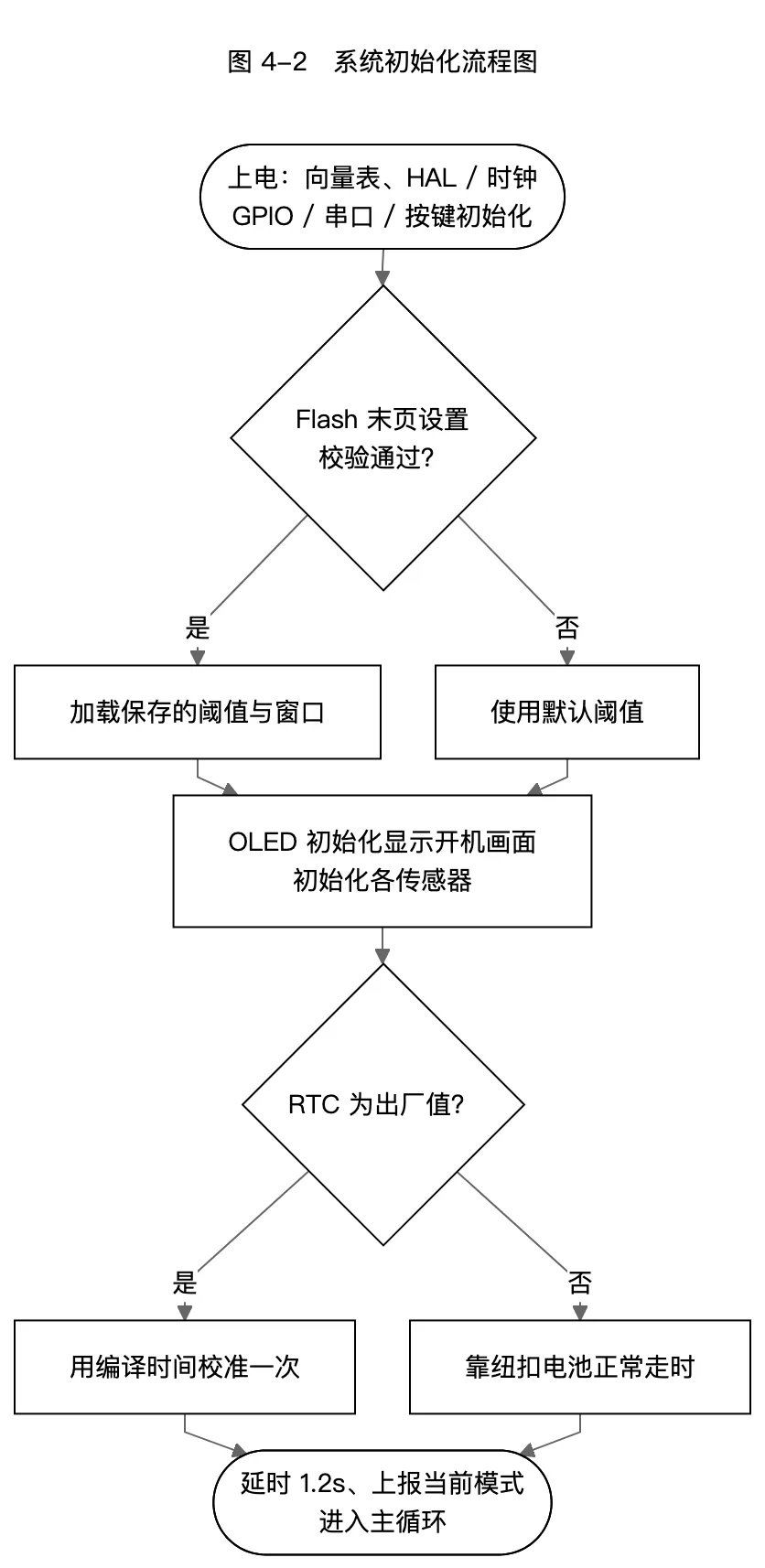
After power-up the firmware: relocates the vector table (this is a standalone firmware, so VTOR must be explicitly set to the Flash base or the first interrupt triggers a HardFault), configures the clock (HSE 8 MHz ×9 = 72 MHz), initializes GPIO and both UARTs, registers key EXTI callbacks, enables the DWT cycle counter (for DHT11 microsecond timing), loads user parameters from Flash, and initializes peripherals. The DS3231 ships with a factory date of year 2000; when a year below 2026 is detected the firmware auto-calibrates once from the compile timestamp, after which the coin cell keeps time.
4.3 Automatic Control Rules
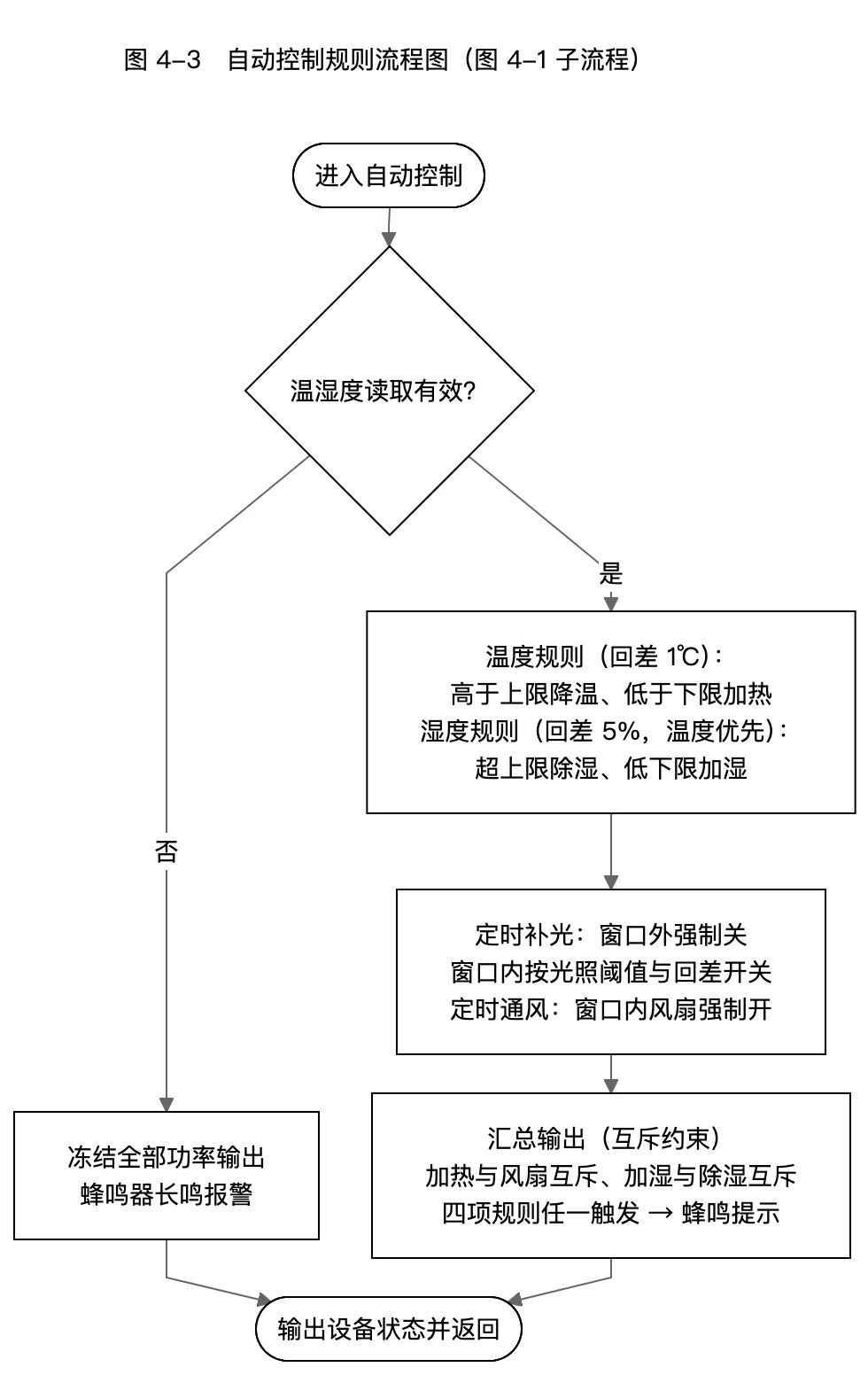
Automatic control runs every 1 second and is the core decision layer, following three principles:
Hysteresis switching. With a single threshold, measurement jitter near the threshold chatters the actuators. Each rule therefore has hysteresis: 1 ℃ for temperature, 5%RH for humidity, 100 lx for light. For cooling: above the upper limit (default 33 ℃) cooling engages, and only below "upper − 1 ℃" does it release.
Mutual exclusion and priority. Heating excludes the fan (shared by cooling/dehumidifying), and humidifying excludes dehumidifying, so the system never heats and cools simultaneously; when temperature and humidity rules contend for the fan, temperature wins. The output stage arbitrates uniformly: fan = vent_window ∨ ((cooling ∨ dehumid) ∧ ¬heating).
Timing window overlay. The light rule applies only within the lighting window (default 06:00–18:00); outside it the grow light is forced off. Within the ventilation window (default 10:00–14:00) the fan is forced on for air exchange, and ventilation does not trigger the buzzer. Windows support overnight spans (start > end) and disabling (start == end).
Sensor fault protection: three consecutive DHT11 read failures mark the sensor faulty, freezing all power outputs and sounding the buzzer — safety first.
4.4 Key and Menu State Machine
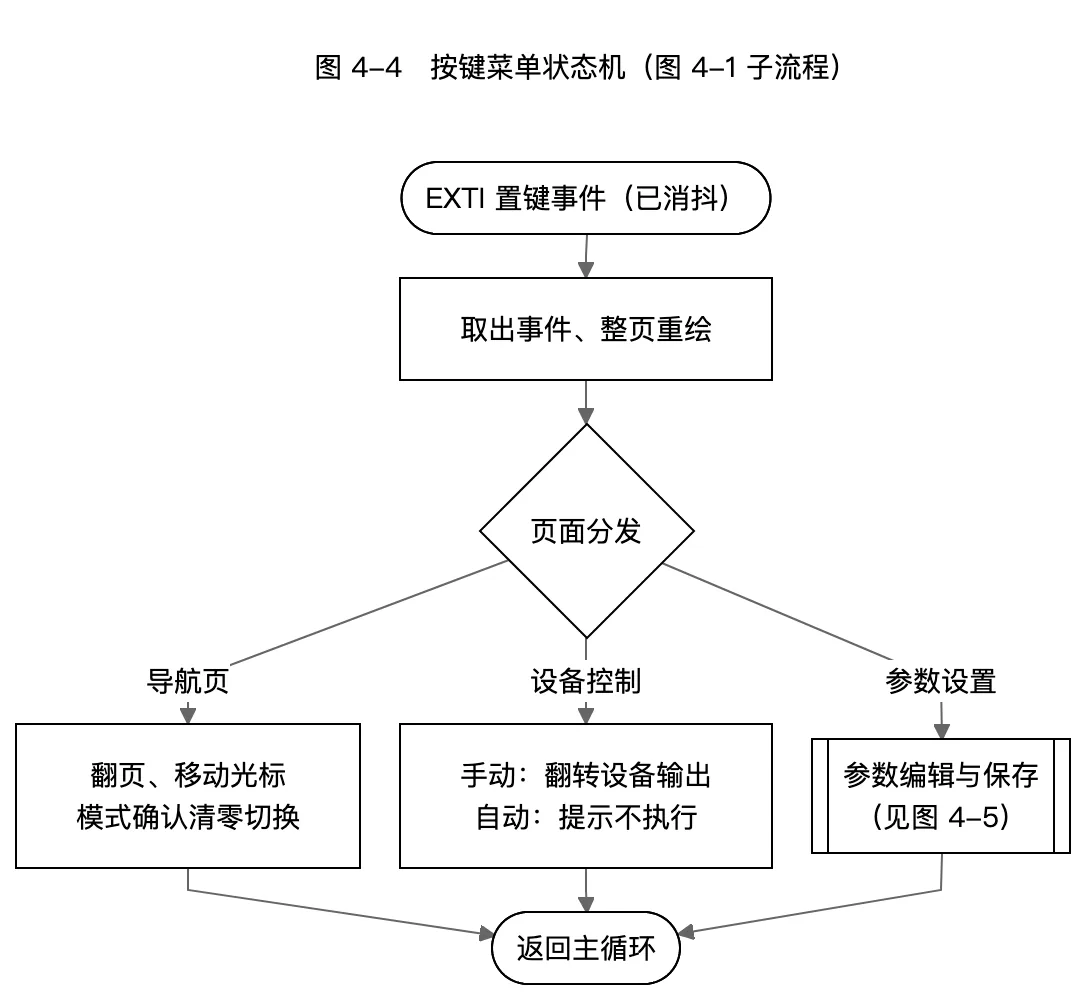
The UI is a 7-page state machine: two home pages (KEY3/KEY4 page flip), a menu page, mode selection, device control, threshold settings and timer settings. Key semantics stay consistent on every page: confirm/enter, back/save, up/increment, down/decrement. Mode switching zeroes all device outputs so the automatic rules re-evaluate from scratch; in manual mode the device-control page toggles devices one by one, while in automatic mode key presses only show a 1.5 s hint instead of acting, preventing accidental control.
OLED refresh uses line-cache deduplication: each drawn line is compared with the previous cache and only changed lines are written, eliminating refresh flicker by construction. Because the bit-banged I2C has no ACK and relay/humidifier EMI occasionally corrupts GDDRAM bytes (a few Chinese glyphs turning into solid blocks), the main loop invalidates the whole line cache every 30 s to force a repaint — a display self-healing mechanism.
4.5 Parameter Editing and Power-Loss Retention
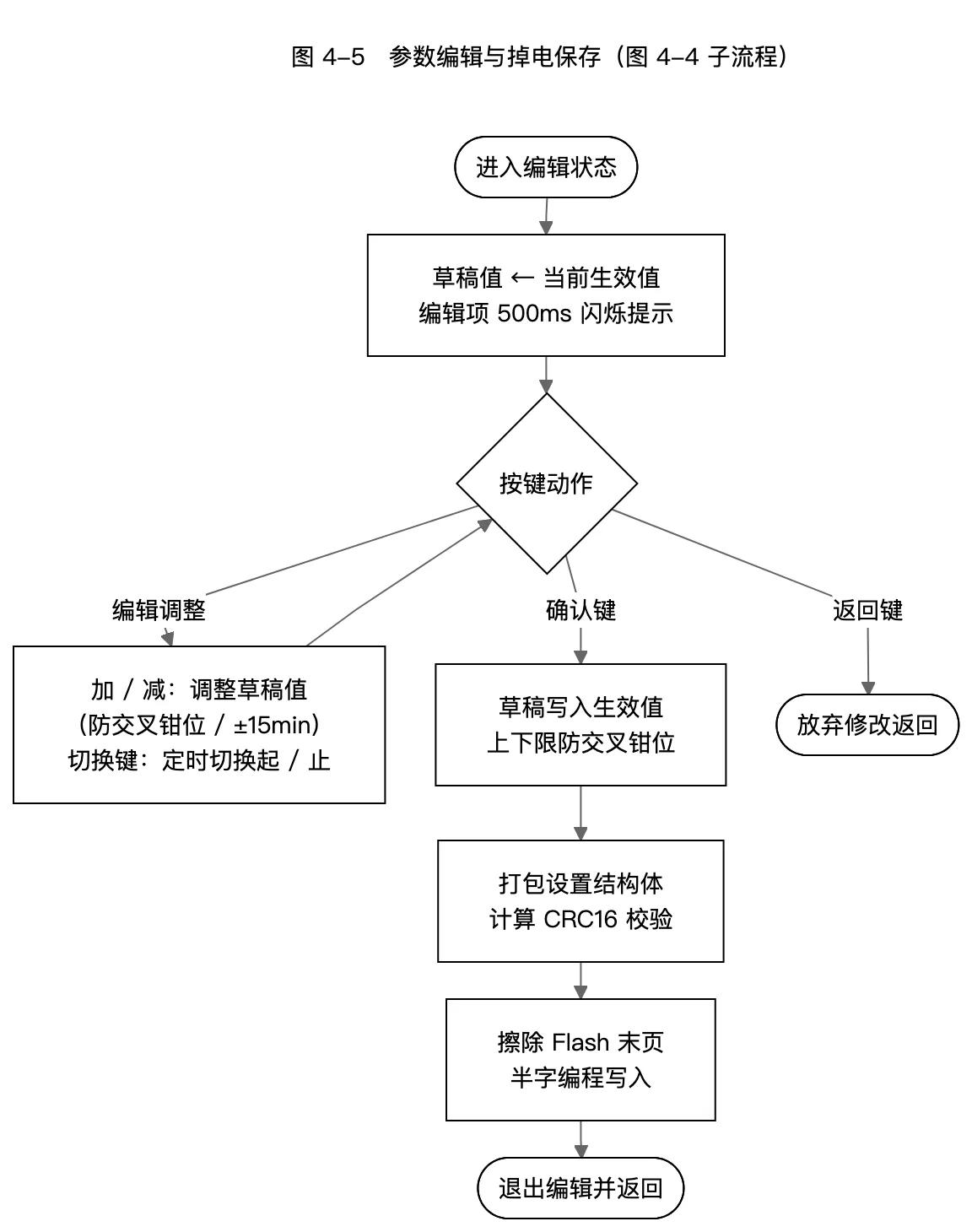
Thresholds are consumed by the automatic rules in real time, so editing uses a draft mechanism: entering edit mode copies current values into a draft; KEY3/KEY4 adjust the draft; the edited item blinks; only saving with KEY2 commits and persists. Adjustments are clamped on the fly so the lower limit stays strictly below the upper limit.
For retention, the five thresholds and two timing windows are packed into a 20-byte struct with a CRC16-CCITT trailer and written to on-chip Flash. A real-world lesson here: the save area was initially placed at 0x08007C00; after the firmware grew to 35 KB, the OLED Chinese glyph table happened to land in the same page, and every save erased the first 13 glyph images to 0xFF, showing solid blocks on screen. The fix moved the save area to the chip's last page at 0x0800FC00 and shrank the Flash length to 63 KB via the linker script — any firmware over that size now fails at link time, preventing silent overwrite. On load, the magic word and CRC16 are verified; any mismatch falls back to defaults.
4.6 Serial Frame Assembly
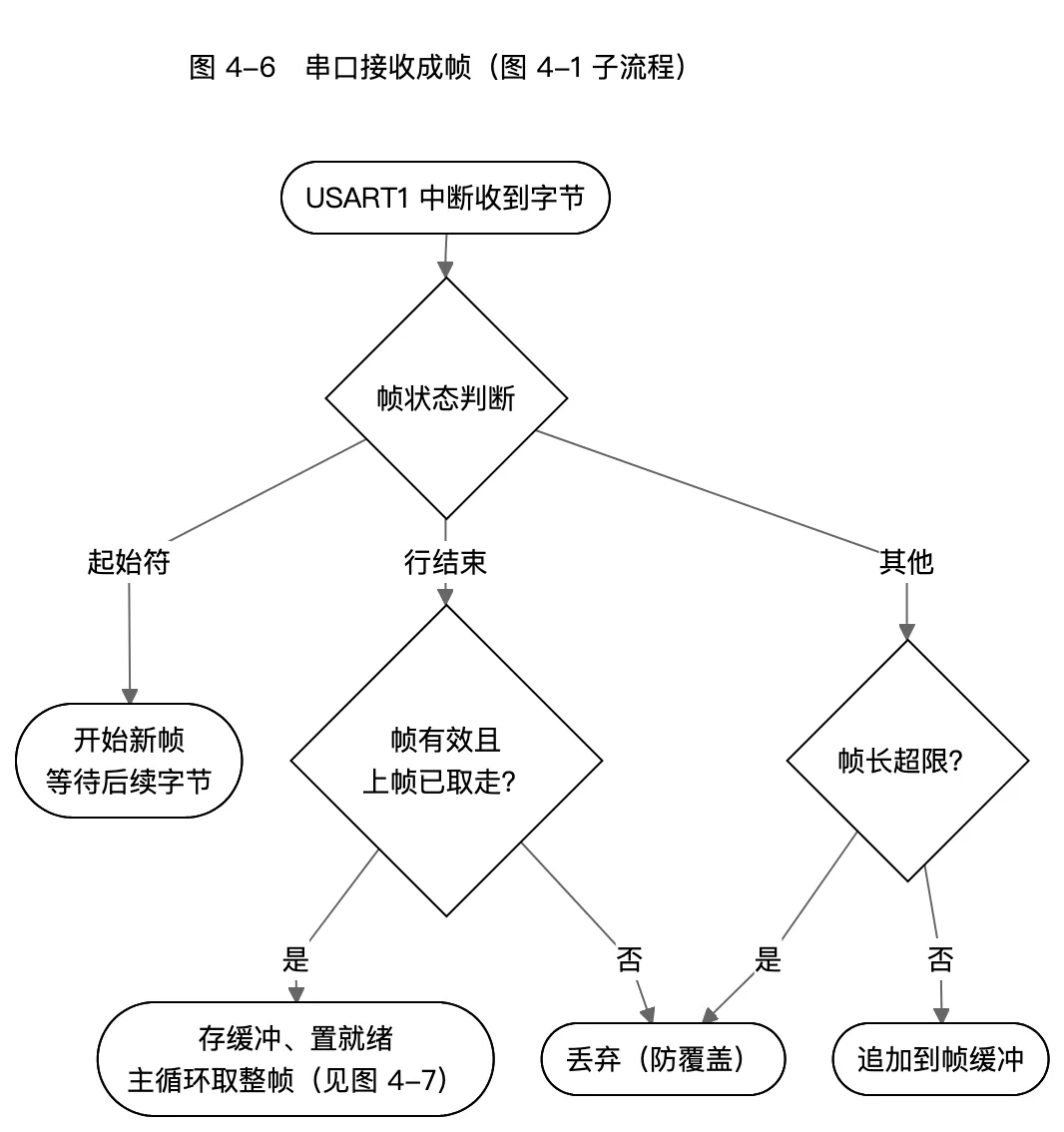
The USART1 ISR does exactly one thing: line assembly. A @ starts a new frame; \r/\n completes it; bytes from ESP boot logs or garbage that do not follow a @ are dropped. If the previous frame has not been consumed, the new frame is dropped rather than overwriting; overlong frames are discarded whole to prevent overflow.
The ISR deliberately avoids HAL receive APIs and reads SR then DR directly: on overrun (ORE) HAL disables the receive interrupt without re-arming, permanently killing reception; the hand-written "read SR then DR" sequence clears RXNE together with ORE/FE/NE/PE, leaving no deadlock state. The main loop additionally checks the receive-interrupt enable bit each iteration and re-enables it if anything ever turned it off — link self-healing.
4.7 Command Parsing and Execution
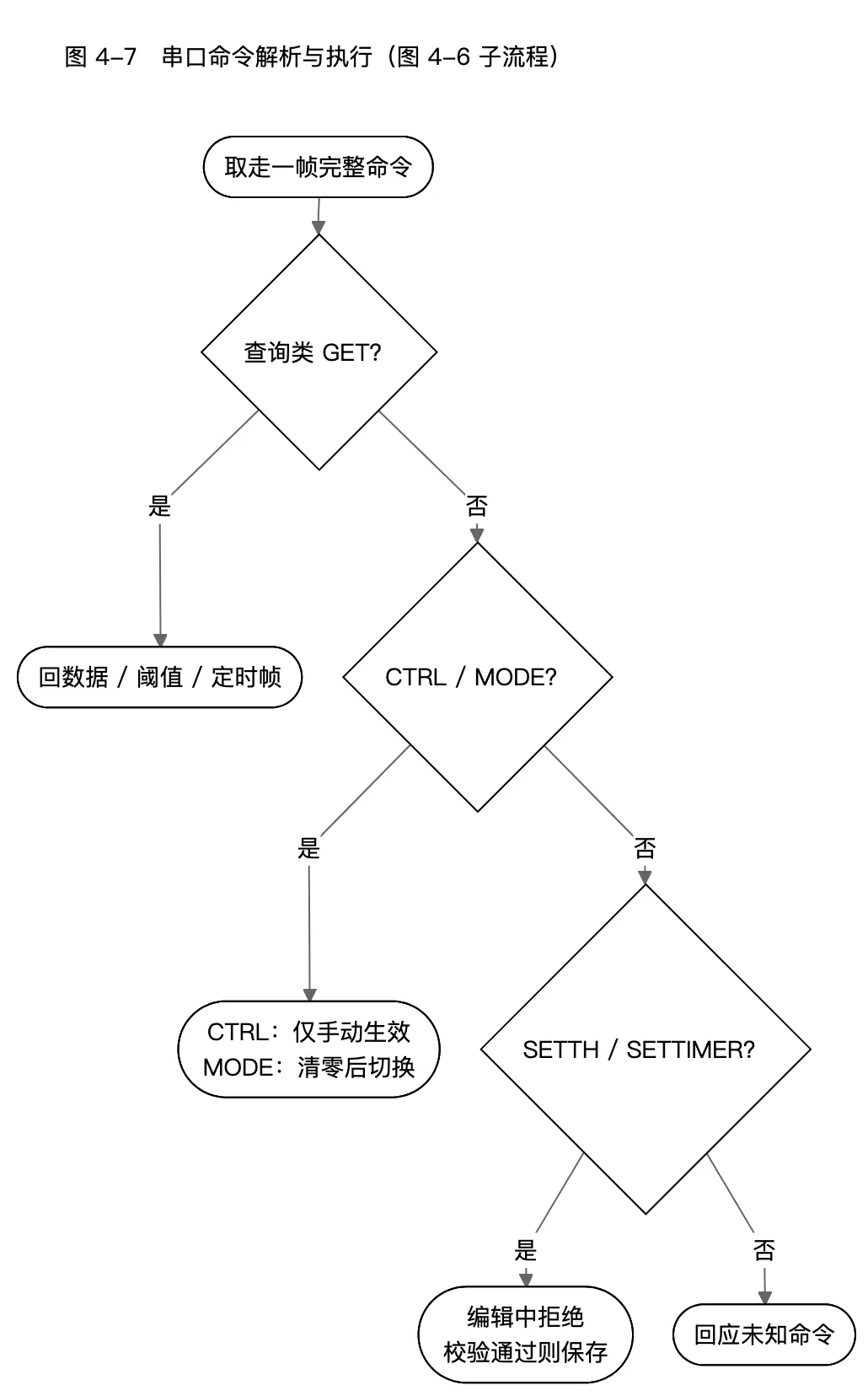
The main loop atomically takes a whole frame with interrupts disabled, then parses it. The protocol uses @-prefixed, comma-separated, newline-terminated ASCII frames shared by the app and web client:
| Direction | Frame | Description |
|---|---|---|
| Up | @DATA,t,h,lux,MODE,FAN:x,...,HH:MM:SS | Full report every 2 s |
| Up | @MODE,AUTO|MANUAL / @TH,... / @TIMER,LG|FV,... | Mode/threshold/window replies |
| Down | @GET,ALL|TH|TIMER | Queries |
| Down | @CTRL,FAN|HEAT|HUMI|LED|BZ,0|1|T | Device control, manual mode only |
| Down | @MODE,AUTO|MANUAL | Mode switching |
| Down | @SETTH,... / @SETTIMER,.... | Parameter setting, saved only when valid |
Execution results reply @OK / @ERR,<cmd>,<FORMAT|RANGE|MODE>. Device control and the OLED menu share the same mode boundary: CTRL commands in automatic mode are rejected (@ERR,CTRL,MODE) to avoid fighting the auto rules that override every second.
5 ESP12F Networking and Mobile App
The ESP12F runs dual-slot firmware (rboot scheme): the immutable recovery slot handles provisioning and web OTA, while the app slot can be upgraded wirelessly at any time — even a failed flash can always return to recovery, eliminating bricking. Its software role is protocol conversion: caching @ serial frames into state and exposing a REST API:
| Endpoint (/api/v1) | Method | Function |
|---|---|---|
/health | GET | Liveness, version, uptime, serial stats |
/sensor | GET | Temp/RH, light, RTC (from 2 s cache) |
/state | GET | Mode + five device states |
/device | GET/POST | Device control (optimistic update, instant echo) |
/mode | GET/POST | Mode switching |
/threshold / /timer | GET/POST | Threshold and window read/write |
/frames / /raw | GET | Raw frame ring and whitelisted direct send (debug) |
Because the STM32 actively pushes @DATA every 2 s, ESP-side query endpoints mostly read from cache with millisecond responses; when the cache is not yet populated the ESP sends one @GET,ALL to hurry it along.
The mobile app is built with React Native with four tabs: Home (live data and device states), Control (mode switching and five device toggles), Settings (threshold and window editing) and Debug (raw frame send/receive for on-site troubleshooting). The app and web client share the same /api/v1 API, and control uses optimistic updates — the button changes color immediately without waiting for the next report, and the actual state is corrected by the @DATA frame 2 seconds later.
6 System Testing
6.1 Functional Tests
| Test | Operation | Expected | Result |
|---|---|---|---|
| Upper-temp linkage | Heat cabin above 33 ℃ | Fan on, buzzer alert | Pass |
| Temp hysteresis | Cool below 32 ℃ | Fan off | Pass |
| Heating linkage | Cool cabin below 20 ℃ | Heater on, fan off | Pass |
| Humidity linkage & exclusion | RH above 70% / below 35% | Dehumid runs fan / humidifier sprays, no conflict with temp | Pass |
| Timed lighting | Shield sensor within window | Light on below threshold; forced off outside window | Pass |
| Timed ventilation | Enter ventilation window | Fan forced on, no alarm | Pass |
| Manual mode | Toggle devices on control page | Toggles only in manual; hint in automatic | Pass |
| Power-loss retention | Save thresholds, power-cycle | Parameters kept, CRC verified | Pass |
| Serial commands | Send CTRL/MODE/SETTH from app | @OK replies; out-of-range → @ERR,RANGE | Pass |
| Sensor fault | Unplug DHT11 | Outputs frozen, buzzer steady | Pass |
6.2 Performance Tests
| Metric | Design | Measured |
|---|---|---|
| Control cadence | 1 s ± 10 ms | Met stably |
| Sensor sampling period | 2 s | Met stably |
| Data reporting period | 2 s | Met stably |
| OLED refresh | 500 ms (line-cache dedup) | No perceptible flicker |
| App query response | < 200 ms | Milliseconds (cached) |
| Parameter save | 20–40 ms per page, only on menu actions | Imperceptible |
7 Conclusion
This paper completed the design and implementation of a smart agricultural greenhouse environmental control system based on the STM32F103C8T6. Hysteresis-based automatic rules and timing windows achieve environmental regulation, while mutual exclusion and priority keep actuation safe and sensible; draft-style editing with CRC16 power-loss retention solves reliable parameter configuration; a hand-written serial ISR avoids HAL receive deadlock, and line caching with periodic repaint gives the OLED self-healing display; ESP12F dual-slot OTA and the REST API enable remote monitoring and wireless upgrades via the mobile app.
Future work includes: upgrading the DHT11 to an SHT30 with PID-based continuous modulation; extending linkage rules to soil moisture and CO₂ concentration; and connecting the app to a cloud platform for remote (cross-network) access and historical data curves.
References
[1] STMicroelectronics. STM32F103xx Reference Manual RM0008[Z]. 2021. [2] STMicroelectronics. STM32Cube HAL User Manual UM1850[Z]. 2023. [3] ROHM Semiconductor. BH1750FVI Ambient Light Sensor Datasheet[Z]. 2011. [4] Maxwell D. DS3231 High-Precision I2C RTC Datasheet[Z]. Analog Devices, 2015. [5] Espressif Systems. ESP8266 Non-OS SDK API Reference[Z]. 2023. [6] Koenig A, Moo B. Accelerated C++[M]. Addison-Wesley, 2000. [7] Eisenman B. Learning React Native[M]. O'Reilly Media, 2021. [8] FAO. Good Agricultural Practices for Greenhouse Vegetable Crops[R]. Rome: FAO, 2013.